What is the use of changing the drive letter?
You can swap the drive letters for your optical drive. Sometimes you install a program from one optical drive and that program runs when the required media (disk) is inserted into that optical drive only and you wish to run it from a different optical drive. In such a case, its pretty useful.
May be you want to change the drive letter for your convenience. Second partition for holding files, third one for entertainment and so on.
How to change drive letter?
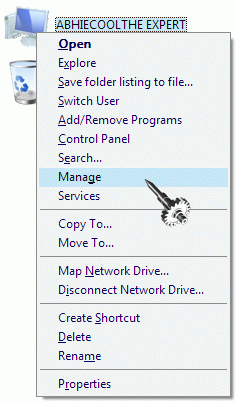
Step #1 Right Click on My Computer and select Manage.
Step #2 Select Disk Management from the pane displayed on left side.

Step #3 Right Click on the drive whose drive letter you wish to change and Select Change drive letter and paths

Step #4 Click on Change and select the one you want.
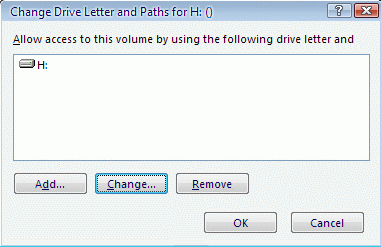
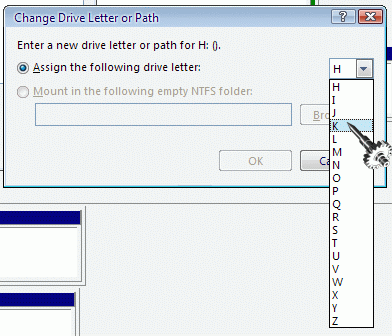
Step #5 Click Ok (as many times as you are required to).
Do left your comments and queries to let me know what is on your mind.
Comments
4 responses to “How to change drive letter”
al i was paying attention to was your retarded cursor 😐
@Chris
It was included in
Vista Transformation packCursor XP. Actually Its dial keeps on moving and it changes orientation while mouse is over a clickable link. I find it pretty cool 😛[…] Posts Google Adsense cracked due to a Security flaw How to change drive letter How to setup Gmail in your smartphone? Use BlackList to Keep Unwanted Callers away Download […]
oh my goodness! thanks soooo much! i’ve been wonderin how to do this cuz i’ve been havin problems since i installed Power ISO. Whenever i try to reinstall Adobe Programs it always asks me to put the DVD in the power ISO drive. Even if i uninstall Power ISO, there’s no change. so really! thanks a lot:D keep it up ^_^)v