
You must have seen that whenever you associate files to open with a particular program, icons of those file types are changed by that program. Considering the case of media players, they impose their own icons on the file types making it difficult to distinguish when there are lots of files of different formats in a single folder.
This tutorial is for Microsoft Window users and it teaches how to setup different icons for different file types so that they are easily distinguishable.
How to change icons for file types?
- Open any explorer window.
- From the Tools menu, select Folder Options.

-
Select the File Types tab. Press a key for searching the extension you want and click on Advanced button.
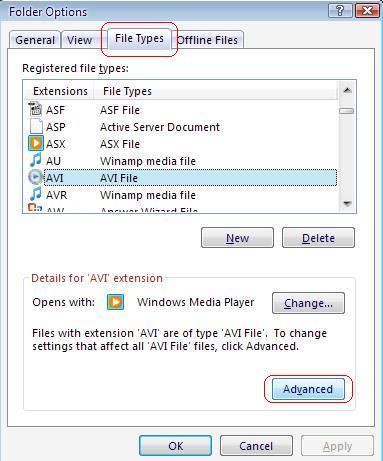
-
Click on Change Icon and select the one you want.

Either you can select the default ones or you can choose browse and select your custom icons. Now you know how to change icons of any registered file type on your computer. Its time to get yourself some sexy icons that you can use in your computer and show off.
Get yourself some eye candy treat, start from google search. You will find plenty of them for every thing & for every occasion.
However, note that icons will again be reset by the program if associations are changed. You will need to change the icons again if associations are played with.
Do share your thoughts on the subject.
1 comment
After doing this double-clicking on a folder now causes it to open the search feature, instead of opening the folder. I now have to modify the registry now to get it back to the way it was before.
This was interesting to me before but not worth going through this mess just to get it back to the way it was. Just a warning to others…
Comments are closed.