
 You can add your blog feeds to your Facebook notes and your blog posts will appear as notes under your profile. It gives more exposure to your blog posts and you got nothing to lose as it doesn’t hurt. Try on.
Add Blog feeds
- Go to your profile page on Facebook

- Under the Share tab, Click on Options.

- Now click on Settings.
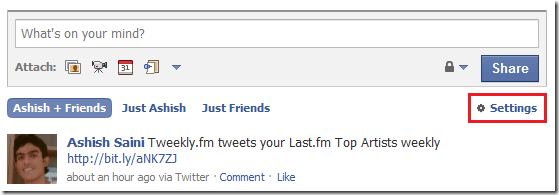
- Now look for Blog/RSS option to add your blog feed.

- Add the feed url here and click on Import.

- From now on all your blog posts will appear as Notes under your profile.
Now your blog posts will have a better chance of getting exposure. Remember don’t let your content go down deep in the archives, get it out, spread the word. Have your say in the comments.
6 comments
I wonder what negative effect this will have in regards to SEO, and having Duplicate content both on Facebook and your blog? Google (and all search engines) hates Duplicate content.
I don’t think there will be any duplicate content issues but I am not sure.
Hi Ashfame,
Well if Google can get to the Facebook post and your blog post, hence their would be duplicate content.
The only way I see around it is making your Facebook account private, that would keep Google out, along with everyone else that doesn’t take the time to ask to be a friend.
I would prefer to see a system like the way LinkedIn does it, takes a excerpt of your blog and sends the reader to your actual blog if they are interested in your article, that would solve both issues.
Comments are closed.