
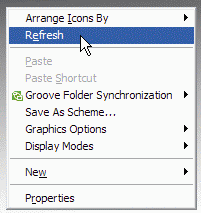
I have seen many all computer users around me doing tons of refreshes thinking that they are speeding up the process. Time to throw some light on it. 😎
What you do?
You clicked on something which is taking a while to load and there you start refreshing it.
What you think?
It is going to speed up the process as you are telling it to do it quickly. Isn’t it?
Point to think about
If the process was to be made fast, then why one would bottleneck the speed. Even if it was and you want a faster processing then why is there no automated option of refreshing it.
What’s the point?
What it actually do is that it sends a instruction of re-drawing the complete display on the screen. That means while your computer is busy with something you are just giving it something else do with something that is already going on. Instead of making things fast, you are delaying the processing as now it also needs to re-draw the whole display.
Why was refresh made then?
It was made to re-draw the display. You made some changes. Although the changes are made but they are not reflected immediately on the display. By refreshing, you are just telling the computer to refresh the display. Thats it.
It can’t get better than this. Still you have any query, feel free to ask in the comments. Are you also in a habit of doing tons of refreshes? Say it in the comments.
38 comments
I had this habit and eventually I got rid of it.
When I see other people doing this, I think that they’re just dumb
@Shankar
Spread the word. 🙂
I use refresh only in my browser. hehe.
Cleared my doubts buddy. I also have the habit of doing it.
@Madhur
You are never too late for changing the habits that u are addicted to. 😉
lol , a point well highlighted, but at the time windows loads, it does make it load the shell a lot quicker, but ONLY once at the windows load. Other than that, its just a myth 🙂
@Atof
Thanks for your comment. 🙂
Well I use refresh, but not for increasing the speed. Sometimes when you copy lot of items from a folder, then the files are arrnaged randomly, so when you refresh it, it gets arranged. I hope you got my point. I feel refresh is not about increasing the speed. 🙂
@Nirmal
➡ Auto arrange does that only. Refreshing the view just refreshes the file list and then they are arranged.
I too have seen many people doing this thinking the same. Its really funny to see people clicking refresh like hell while waiting for an extremely slow program to load 😛
@Beta3
I just make them understand the fact but some of them are too addicted to it.
I am an addict to this attitude
@chuks
Kill the addiction of refreshing again and again. 😈
While I agree that many people are ignorantly addicted 😈 to the desktop-right-click-refresh, I do find that some people (such as me) use it on rare occasions to see whether MS-Windows is quick or responsive enough (:!:) for our needs.
When we right-click and refresh, we can get a feel of the time it actually takes (default is supposed to be 400 milliseconds) to display the content menu, and whether the refreshing of the desktop icons is instantaneous as well.
If either or both of these actions takes longer than expected, it would indicate that the explorer.exe shell process is still “hooked” 🙁 by an unresponsive (or background) application. Then it is time to bring up the Task Manager and hunt down the rogue app. 😉
haha i actually developed a habit of this recently. thanx for clearing that up
@Vivek
I agree. 😀
@Rhahkeem
You are welcome. 🙂
Cleared my doubts . thnks..
true and I’m getting annoyed by other users who frequently does the refresh habit……..
people sometimes just copy what others do and they thought that by doing this they know a lot about computers……..
@coolworld
Yeah! Most of them are the local internet guys.
Hi, my names Matt and I’m a screen refresher…
I know this doesn’t do anything useful but its so ground into my brain that I can’t stop.
Is there any form of therepy for Screen refresh addicts?
Why most people do this?
Back when the computer speed was slow, this i believe this helped you redraw elements on the screen. Back then, you wont have any idea whats happening until you do this. So it was a common practice to refresh the screen, believe me, most of the time it does work. But now since the computer speed is fast, it got to redraw faster, multi threaded OSes and multiprocessor. This is not useful anymore, but people made it a habit and that’s how this became a myth. 🙂
habit -< myth
True! 😉
I refresh every time at the desktop after done with a window, habit since 1st time I use a computer as a kid. I don’t know why I refresh, just thought about it now and meet with this site 🙂
Haha.. Yeah I am totally aware of it.
Yeah…! The local internet guy had come to my place…somethin was wrong wid my net… He was continuously refreshing by pressing F5 for bout 20sec. every min on d desktop.. and he went! ????!! it did not do nythin to d net speed still..!! dey thnk others r fools!
They are the real fools. Don’t even know what they are doing.
This seems to be a common disease of technicians everywhere! The one good thing about this is that, it allows me to easily spot idiots/technically challenged folks.
Yeah! Folks everywhere do this to look techies.
Clearly explained… Many people misunderstand this.. Windows usually does the refresh automatically…
For most people, you never really have to click the refresh button.
It’s like all the people who continually hit the “close door” button in the lift, or the button at the pedestrian crossing – they think that by continuing to push/click/refresh or whatever that it will magically happen more quickly!
haha.. nice example 😉
here is a solution for all those who do right-click refresh but just can’t get rid of it… have a look
http://www.OneBillionMinds.com/2010/2182.html
Lolz! Its damn funny
I discovered this logic many years ago 🙂
so this is the logic behind it..no wonder my pc ended up hanging and re-starting when I start to click the refresh button..lolz
So.. finally someone spread this… hope many people read this (especially computer repair guys) who keep on refreshing and stop the pointless habit!!
LOL, you are correct, I’ve observed those Guys…
A good point you highlighted, addiction of Refresh lol, I am too addicted doing that, even then I know that it doesn’t speeds up the current processes,when you lookout the Task manager while refreshing continuously (F5), you’ll see it increases the CPU Usage from 1%-5% to 80%, 90% or even 100%.
Can anyone help me about this; what refresh does internally(technically) when we click on this(Right click> refresh)?
Comments are closed.