
Since our college is in the outskirts of city and there is no provision of internet in our hostel, the only way to get connected to internet is to access internet through one of the dial up services like AirTel, Idea, BSNL etc. This tutorial shows how to access internet through AirTel Mobile Office (MO) on your computer (Desktop/Laptop) via Data Cable / Bluetooth. I have cover here the method of setting up a Nokia phone (my Nokia 3230) on windows with the help of Nokia PC Suite. If you want to setup connection without installing PC Suite, then you will need to contact AirTel for providing you manual settings. Apart from this, I will be only using the PC Suite to setup access for the first time and then there is no need of PC Suite software.
Setup AirTel Mobile Office via Bluetooth
- Install Nokia PC Suite on your computer.
- Switch Bluetooth ON on your computer & mobile phone and make sure both the devices are able to detect each other. If they are not being detected, then you can try enabling discovery in your bluetooth settings (on computer).

- After being detected, your Nokia phone will itself appears as connected on PC Suite. If not, click Get Connected and select Bluetooth. You should be able to connect your phone now.
- Select Connect to the Internet option.

- Select Settings.

- Select your Modem (Standard Bluetooth over Modem link).

- Select network operator (in our case, its AirTel India).
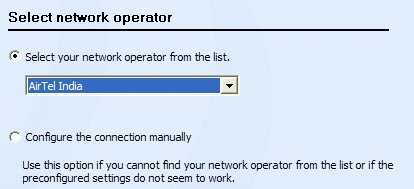
- Now click Connect and you will be live on the internet.

Setup AirTel Mobile Office via Data Cable
- Install Nokia PC Suite on your computer.
- Connect the phone to the computer via Data Cable.
- Your Nokia phone will itself appears as connected on PC Suite. If not, click Get Connected and select Cable connection. You should be able to connect your phone now.
- Select Connect to the Internet option.
- Select Settings.
- Select your Modem (Nokia 3230 USB Modem).

- Select network operator (in our case, its AirTel India).
- Now click Connect and you will be live on the internet.
Pretty easy! Isn’t it. Now that you have setup the settings, you can un-install PC Suite and continue using it. One more reason of not using PC Suite to connect to internet is that you will have to keep the One Touch Access window open all the time. Here is how to do it.
In Win XP :
- Open My Network Places by clicking on the desktop icon and if the icon is not there, then open My Computer and then pressing the UP button and you will see the My Network Places.
- On the left column, select View Network Connections.
- You can now see icons for DialUp connections you just setup.

- Right Click and Create Shortcut on Desktop.
- You can now use this shortcut to connect to internet. (Leave Username & Password blank)
In Win Vista :
It should be in the View Network Connections only. Look around and make your way out simlilarly as described in case of Win XP.
If you are facing any issues in connecting internet through this method, then let me know about it and I will try my best to help you.
153 comments
Hey ashish nice post with step wise instructions. I had us mobile office many times n still using it. I got a question for u. Does speed of internet changes when connected with bluetooth dongle or data cable? Or it remains same in both case. Other thing I wanna tell u is the best time to download while using internet on pc via mobile is in morning 3 am to 8 am This is the time when you get maximum speed.
@Jayadrathsingh
Speed of internet is limited only when you are connected via bluetooth and you are getting good speeds (EDGE) else it doesn’t make any difference.
Bluetooth Connection gives you ~ 115Kbps and Data Cable Connection gives you ~ 460Kbps. This is the speed with your phone is connected with the phone and the maximum transfer rate it can achieve. You won’t get greater speeds than your connecting speeds even if your internet speed is good.
So connecting via data cable is a better option and also it saves you on battery as bluetooth connection increases battery consumption rate.
I hope I am clear. If not, then let me know. 🙂
when i connect my n72 to pc. i cannot browse in pc when i connect to internet (mobile office )it says one touch is failure. What are the methods to connect internet
why you want to connect it .
To have internet in remote areas
when i connect my n72 to pc. i cannot browse in pc when i connect to internet (mobile office )it says one touch is failure. What are the methods to connect internet e mail me fast
@pavan
Can you describe your problem in detail?
Dear Friends,
This is anjan here from Bangalore. I have a query.
i am using my N70 Mobile set for Internet connection to my Desctop PC. Whenever I connect my Mobile to the Internet it shows the speed is 460Kbps. But in reality it doesn’t work that much speed all the time. Is it a problem with My handset or the Server speed?
Note: My HandSet is having 1GB Memory card. In that I am using around 600MB for Music. Is it matters to the internet Speed.
Kindly clarify me.
I am using my N70 Mobile set for Internet connection to my Desctop PC. Whenever I connect my Mobile to the Internet it shows the speed is 460Kbps. But in reality it doesn’t work that much speed all the time. Is it a problem with My handset or the Server speed?
Note: My HandSet is having 1GB Memory card. In that I am using around 600MB for Music. Is it matters to the internet Speed.
Kindly clarify me.
Regards,
Anjan. Email: anjanhsd@gmail.com
I have a Lg dynamite Kp 220.I didnt get any pc suite through it.
When i connect my mobile to any pc i get to options on my cell phone
1.COM port
when i choose option 1. the com says there r no software to detect the phone/drivers 7388
when i choose option 2. the phone simply switches off and behave as an USB.
i want to set my internet to my PC through mobile.
it is gprs Vodafone enabled .
Please help.
@Anjan
The speed it shows is the speed with which your mobile device is connected to your computer and not the speed of internet. Internet speed depends on various factors like traffic, free bandwidth, location etc
@Anjan
The speed it shows is the speed with which your mobile device is connected to your computer and not the speed of internet. Internet speed depends on various factors like traffic, free bandwidth, location etc
@Clifford Dmello
You will need the drivers of your phone. Without it you can’t get it detected in your phone. Ask the manufacturer about it. They might point you in some direction.
Rest In Peace
hey my handset is ngage qd doest it support for this services wl i ev tried but its doesnt get connect so plz help me
It is very helpful & easy way
I m not able to conect my nokia 6233 to internet by one touch i have airtel mobile office i m geting an error message say in that ur moden is not confregured propely or used by another application plz plz help me
@sunny
Well It must be supporting. Kindly consult the manual which came along with it.
@Cletus
Some problems always creep into connecting to internet. Its better to get in touch with Airtel GPRS helpline (Not the regular Customer Care – Ask them for GPRS helpline number)
I have a Lg dynamite Kp 220.I didnt get any pc suite through it.
When i connect my mobile to any pc i get to options on my cell phone
1.COM port
when i choose option 1. the com says there r no software to detect the phone/drivers 7388
when i choose option 2. the phone simply switches off and behave as an USB.
i want to set my internet to my PC through mobile.
it is gprs Vodafone enabled .
Please help.
@Reena
You will need the drivers in any case else your phone can’t communicate with the computer.
hi ashish.. ur site is very helpfull..i hav a question..does the speed depend on the phone u`re using?? i mean which one is a better phone for mobile office.. nokia or sony erricsson?? does it make any difference actually??
@pravin
It doesn’t matter on the brand.
The only case in which there will be bottleneck in performance is when your network provides EDGE coverage but your phone doesn’t support EDGE but only GPRS. So you will be connected at a lower speed.
Apart from this your connecting medium also matters.
Data Cable gives high speed as compared to bluetooth connection if network is providing high speed connection as then the speed of communication link will decide the total speed (it will act as a bottleneck). I hope I am clear.
hi i ve nokia 2600 classic ..i dont ve data cable for this mobile feature but i ve bluetooth …can i used mobile office for airtel with my moblie ……
@Zahir
Yes you can! Get the drivers for your cell phone from http://www.nokia.se/A4919317 and follow the step by step tutorial. Let me know if you need any more help. 🙂
Sir, kindly hacking mobile office satings for Nokia 3230 and Pc.
Sir, NOP Hacking Satings Can’t open pc page. Send satings. My email ID ajitesh.roy@rediffmail.com
Sir, kindly Send hackings satings Mobile office . IP addres…,Proxy No…, Acciss point…Etc. My email ID ajitesh.roy@rediffmail.com
sir, I am use nokia n70.i am access mobail office setting but internet speed not contune & not better condition.please send me any idea to up & regulare my internet speed
I want mobile offic hacking sattings.
no hacking
Thanx friend i like helping people like you. Nice job man just keep on pimping and you’ll be the best one in your job.
thanx for guidelines which was so clearly stated.
thankyou
Hello Friend … It’s very well described .Now I am able to connect
my computer through airtel network yobut still I’m facing little problems like web pages connot be opened anyhow connection was successful and giving a message
telling that net now conneted and speed is 115 . kbps . If
you have any idea please contact me.thanQ
I get connected without using pc suite by dial up. Speed of 428kbps is also shown still no webpage is accessible.
Mobile Office is very good but little but speed is slow. it is very slow connection.
Hi am using nokia 3230 and airtel mobile office to connect my hp 550 laptop with windows home basic to the internet.
My problem is
DATA CABLE:
Case 1
Click connect from one touch access(OTA). It says connecting device and ends up with error “Failed to connect to the network! one touch access could not connect to the selected device”
Case 2
OTA will say opening port >connecting device>verifing user name and password, and end up like “Failed to establish a network connection”
when these 2 error message come up it usually works when i restart my phone.
With Bluetooth
“Failed to connect to the network! one touch access could not connect to the selected device” . I have to restart my phone to establish connection.
The biggetst problem with bluetooth is that the connection wil be lost after some time although OTA says connected. The small “light green ballon ” between two computers will disappear in my windows taskbar and IE will not open any page. I will have to reconnect to make it reappear and use internet.
ok
i have HP laptop HP DV6929NR With WIndow Vista Home Premium i want to access intenet Through mobile …ill try both method u have define here through bluetooth and and Nokiya PC Suit Both but cant Access intenet ,when i used Pc Suit Dta cable thent Settings and Connect option not Enable both r disable and Modem not found msg Given …and ,with the help of blue tooth also unable to connect it can u Help me for thsi Pleas give a solution …
It is free of cost to internet through mobile phone using mobile office?
Nice Post, it will helpful for me because i want to know how to getting Airtel internet connection via data cable and u already give solution in your blog.
Thanks
Rajan
dude i need procedure to access mobile office on my sony ericsson w350 mobile
I have free mobile office but the speed is low because the edge connection is not comming. Plz tell how can i get the edge network. My mobile supports edge.
Hi nice work friend.but i hav 1 problem regarding net on pc by using bluetooth of nokia 2600c.i activated airtel mobile office on my phone and still it is running.i used net on pc by bluetooth connection for few days.but now i m not able to run net on my pc wid nokia 2600classic bluetooth connection.wen i try to make dial up connection wid pc,error 734 is shown which has ppp link protocal was terminated.however mo still runs on phone nd when i use this sim in other phone,i able to run net on pc by bluetooth.is there is some fault in my new nokia 2600c or anyother?plz explain?what should i do?whether i should contact nokia care?ur kulveer kotkapura punjab
pc suite cant able to find modem is there any soution ???
hoe can free gprs use on laptop pls help me
thanks!
i am having a chinese mobile,i have done manual settings to browse in mobile.i can surf internet in mobile,but i could not connect to the computer.
i have data cable,but i dont have pc suite.
give me a way to create a setup
Tell me trick how can i use airtel mobile office free on computer.
Hello how r u brother plz tell me how can i am acess free internet , mo is active on my no it is free but nothing is downloaded plz tell how can i free acess the net on mobile office
Dear sir, i m using nokia 3110c. Airtel sim card. When i m trying to connect internet in my pc through pc suite, it shows an error 720. Connection to the network can not be establish. But when i connect to internet in my cell it works well
can u give me gprs settings for chinese mobile with vodafone.
i m using nokia 2600c. i have already MO settings on my mobile. i want 2 using free internet on pc (5671#). plz send the tricks. and i want r u a orkut user? how can i use free internet.
can anybody tell me how to enable free mobile office
Hello Ashfame…. Pretty good work. Appreciated. I need your help. I will be India for 1 month. During that time I would need to access internet/IM through my laptop probably using my 3g cell phone (LG Incite). I plan to get a local sim card on rental basis. What features are avaialable in rented sim card; I mean, Data, MO etc. and which vendor can provide that? I will be in and around Kolkata. I probably will be able to set up connectivity part between phone and PC, as I am having similar connection already set up now (in US), as my cell phone has Data services and gets internet directly in the phone. I want to know what type of SIM card/services I should rent for that short period of my stay in India. And who supports that? Looking for your answer or any good link in this area. Thanks.
@Syamal
Internet from SIM cards is a poorly managed affair here in India. Don’t expect too much speed. If your budget allows then go for a data card with a limited plan. If you just need access for checking mails and things that don’t require much bandwidth then you can bet on SIM cards. I would recommend Airtel Mobile Office Plan. It should cost you 8USD for a month. Pretty cheap. Isn’t it? Let me know if you have other queries.
Thanks Ashfame for your quick response (you rock!!!).
I read somewhere that getting Airtel MO (or any other) needs some paper work – like photo, passport, etc. and can not be done online. Is that true? I prefer to manage everything online and probably SIM card also delivered in my India address and when I land in Kolkata, I just change the SIM card and get connected. Let me know (take your time, I can wait :-)) Thanks again.
@Syamal
Yes you do need to complete the formalities but you can buy a SIM hand to hand if you know someone here who can provide ID & Address proof and take the connection on his name. Regarding the online booking, I have no idea but there must be a provision for foreign customers coming for a month or two. Better get in touch with their customer support.
how to connect to net on laptop using my samsung mobile(bluetooth featured).
i have an aircel pocket internet.
net is on the mobile but cant connect to my laptop.
give me suggestions…
I have a nokia 3110c and i want to nokia pici suite software connect to wab on airtel mobile office
I am broken my Airtel Sim. Better way for internet is BSNL Broadband.
Some point for comparing Airtel & BSNL.
(1.) Airtel charged Rs. 20/day with 8mb limit it’s mean Rs.600/month for 240mb. But BSNL Broadband offers Rs. 250/month with 1024mb (1GB) limit.
(2.) Airtel charged 75 Rs./mb if you crossed free usage limit But BSNL charged only 0.40 Rs./mb.
(3.) Airtel’s maximum net speed is only 5-15 kbps But BSNL provide 512 kbps to 2mbps.
Some other BSNL Features:-
Now BSNL landline connection is free
BSNL gives free Insurance worth Rs. 5000 to Landline customers
BSNL provide Linux based NovaNet PC in just 2300 Rs. for Urban & 3000 Rs. For Rural Broadband Users, to know more visit http://www.novatium.com
NovaNet users also get 20% discount on all broadband plans.
Special plans for Rural Customers
400mb @ 99/month
1GB @ 150/month
4gb @ 250/month
with free Landline connection, Free Modem & Free Installation.
So Compare & Enjoy…
send ur comments to ankush550@gmail.com
.
cant setup my bluetooth device on my laptop it’s suppose to be inbuilt but recieves an error message that says
An error occured while windows was saving your settings. The blutooth device might be unplugged.
The following settings were not saved:
Discoverability settings
Connection settings
@wilfred
Its an issue which was faced by me too. Try searching on Google.
airtel mobile office gives only 10-15 kbps speed which is not sufficient i need at least 30 kbps for browsing net. I am student of biotechnology and it is +ve thing for to brows the net 10 Rs/day because ican’t buy broadband cards.
@Vinay
You can’t get 30KBps on regular data cards. You will need to buy the newer ones which works on 3G spectrum like TATA photon etc
I WANT 36 SETTING FOR MY SAMSUNG S5603 MOBILE TO
CONNECT P.C. WITH BSNL 3G SIM.CAN YOU
SOLVE MY PROPBLEMS.THANK U
reena i red ur problm so for conecting ur handset with the pc for creating any dial up conection .so first u have to download pc suite for ur handset u can get it from http://www.lgmobiles.com and set ur handset and download pc suite for ur handset there . and then while conecting the mobile with pc with usb select com port option and form the conection in apn type airtelgprs.com if u using airtel sim and dial up no is 99**1#.if u want to ask any question regarding this so mail me at dude_arun89@yahoo.co.in
blutooth not conecting may be more then 10 devices in ur handset my devices folder so u check if more then ten blutooth handset in ur mobile so u go to settings>blutooth>my devices and delete all devices and then try to conect ur hanset will conect with ur pc
Buddy i own a Samsung Corby S3653 with GPRS activated. Will the same settings applicable for it too ?
The procedure will be similar. Try on.
Can anyone pls help me how to get sony ericsson z550 wmc usb data modem driver please ?
Google them or look on manufacturer’s site
I tried both torrent as well as google search for that drives but everytime it shows some instant online scan and does not allow to download that particular drives…its a request if you can please send me link to the file if possible for you ?
Don’t look on torrents for now. Go to their official site and there look for it. If you need more help, then contact their support.
If your one is pretty new in the market, then it might not be having drivers at the moment and if it is having them, you will find on their official site for sure!
hi…my phone is a bit old one sony ericsson z550…i also tried to look on the company site but they show that no drivers are available for this phone…
You got to find the drivers somehow. A simple google search reveals so much. Have you tried those links?
It is not working in my phone nokia 5130 c-2 xpress music
help me
what problem are you facing?
i have lg kp 220 and when i connect it with computer and choose com port i didnt have 7388 driver now what i do.
i waana connect it to internet.
pls help.
You can’t do it without the drivers.
AirTel Mobile Office via Bluetooth in this i dont have any modem options in modem list
I am not sure! Try reinstalling the latest version of PC suite and make sure that your bluetooth device is working
Hy..I have been using mobile office via my pc since a month.I have a nokia 2630 wich i connect wid ma pc via bluetooth..everything was fine until yesterday..now I am getting an error whenever i try to dial..The error goes like The modem you r trying to connect with is busy..i have tried everything..turning on off my cell..reinstalling pc suite..drivers..what cud be the problem??any solutions plz..I am using windows xp
try on a different PC once, if its working, then the problem is with your PC configuration or else may be in phone :/
it wsnt d prob wid d pc…it ws some packet data access error in d cell..bt thanx anyways man…
Glad to hear that it was resolved! 🙂
after recieving settings my net ould be open to others laptop but it could not open to my pc. i already downlod pcsuite and bluetooth but notice shows mw. modem problem.and airtel custmer care can’t reciving or contact not done.
MO no – 08128043427
Is it showing the “device or modem in use” error…first make sure that ur cell is synchronised with your pc suite…See if u r able to check ur phone inbox from pc suite..if so..then in connect to internet option of pc suite..goto connect to internet..then settings..then configure the connection manually…then provide access point airtelgprs.com…Leave all other tabs blank…retry connecting..if it still doesn’t work…goto settings option in ur phone…then connectivity..then packet data…then packet data settings..edit ur access point there..name it whatever u want to..but packet data access point should be airtelgprs.com..change it to that if it is not that..then exit all the menus..and try connecting again..I hope it solves ur problem..
I can’t get a word.
Get in touch with customer care only..
Hi Ashish,
I’m Dr Rohit. i have a samsung corby activated with airtel gprs service & now i wanna connect net using this gprs on my laptop. tried to do so using samsung pc suite but the result wasn in my favour. can u pls guide me on how to connect ths stuff to my laptop?
Hi Rohit,
The basic idea of connecting is the same. You just need to figure out what is to be done in your mobile. Try catching the keywords and look for them in your mobile menus or a bit of reading the phone manual wouldn’t hurt. Right?
Hai Ashish..
Thanks for your beautiful photogenic explanation of connecting the internet used in mobile phone to PC or laptop. Its very much useful and once again thanks a lot for your knowledge sharing.
Snehamudan,
Muthu (Chennai)
Hi,
Thank you for your words 🙂
Hey Ashish..
Its nice article..very much easy to understand and informative..
If you could same thing explain on Mobile office airtel setup with nokia 6233 will help more.
Hi,
Just follow the steps buddy. The steps are fundamentally the same for every nokia handset. They may vary for different company handsets as their PC suite options will vary.
correct,can you tel me the configuration in nokia handset.
like you have explained here.
Don’t you have a PC suite? These steps are for Nokia only. If you want to do it without PC Suite, then get in touch with the Customer Care so that they can tell you the dial up number with username and password (which are mostly blank).
Hope that helps!
I’m Parag Chakraborty. I have a NOKIA N-72 activated with airtel gprs service & now i have connected net gprs through ‘Mobile Office’ on my desktop but I unable to Download any kind of software like antivirus..
and also some site disply this type of massage:-
“The page you are looking for is currently unavailable. The Web site might be experiencing technical difficulties, or you may need to adjust your browser settings.”
pls inform me and solve this problem.
Regards
Parag chakraborty(9635508339)
prgchk1976@rediffmail.com
This has to do with the speed of your dialup. If you think you are getting extremely low speeds, then get in touch with the Customer Care.
Pls send me full information about How to setup network connection on pc using modem nokia 3110c with airtel connection.(i use data cable)
I highly suggest all the people here to not subscribe on Airtel Mobile Office. The activation and receiving mobile office settings is easy and Airtel will provide you good service for activation. Once activated you will be in trouble. If you de-activate it, you will receive messages like” Your Mobile Office Service Has Been De-activated”. But, the deduction of money from your account will never stop. This happened to me and I lost more than Rs-200. Everyday they deducted Rs-10 and I keep on sending them emails and they keep on de-activating my Mobile Office. I received more than 10 de-activated SMS messages from them but the deduction of money never stopped. Their system is not reliable and the support staff don’t have any clue what they are doing. Finally I switched to another service and started publishing my problem all over the web. Be aware of Airtel Mobile Office service.
These things can happen with anyone and with any service. However you may be cautious.
How it could happen to anyone and with any service. Some one taking the money and we should keep quiet, what a shame. When they are technically not able to solve my problem from their side, how I could be cautious. What I did was just activated their service for 5 days then deactivated as per their procedure. What else a customer can do from our side to be cautious. FYI they are still deducting my money every day after I send several emails to their support and the Nodal Officer incharge of south region. All I got every time is a SMS stating that your mobile office has been de-activated. The next day again Rs-10 deduction. I am fed up of their service and stopped re-charging my account from today. Only receiving incoming calls.
Yes! I got so many daily deductions on my BSNL for hello tunes that I never subscribed.
My friend’s sister using Airtel and my mom using Reliance got their balance deducted for no reason.
I have been enjoying SMS @ 1p when everyone was enjoying at 10p on my vodafone.
So its just that some glitches can happen with anyone and on any network.
So, you mean as a customer we have to accept those deductions. This is not deduction. This is stealing our money. As a citizen of India, I will not stop at this point. I am working on a way which is purely legal to make them refund my money back.
I accept your point of ” Glitches can happen”. But those are not acceptable even after I made so many complaints.
I am not asking you to accept them. Your time, you decide where you put your time and energy.
I am just talking about myself, I don’t care to call Customer Support till it really comes in my way.
sir i have gfive mobile and airtel connection how can i connect my mobile to my pc for internet gprs service and i have also nokia 5233 and i want to increase the speed of connection if it is possible
Hi Ashish,
I have nokia 6233 and Dell laptop with Window 7. I am facing OTA error while connecting the internet, i mean status shows the internet connection is connected but pop says no network access.
Kindly help.
Pravin K
campravin@gmail.com
Its may be a bandwidth issue where you are connected but don’t have any bandwidth to use as excessive users are connected and using it and you are being starve. Try contacting their Customer Care.
i have a spice mobile. i want to connect the internet through mobile phone, can i coonect the internet
plz reply
ofcourse you can, read its manual and see how can you create a dialup and obtain dial up details from customer care
i want proxy address
Get one from a proxy site
how to access internet settings through AirTel Mobile Office (MO) on my laptop (windows 7) via Bluetooth. I have a LG KP199 mobile phone. and also activate mobile office in my phone. but I can’t connect internet in my laptop so please help me.
please mail me: szay13@yahoo.co.in
hi goswami- you will call airtel gprs custemer care (12118) they give the steps to coonect the internet via blutooth
not regulerly,but many time network bar in my nokia 2600 mobile is totally vanished & net-connection losts while using mobile office in desktop.after switch off & on it reappears.plz tel me what is the permanent solution?
IDM can increase u’r downlode speed (in mobile office) more than 40kbps.
Can anybody help me…i m having problame to connect to the net from my nokia5233 ,i m using airtel mobile office,when i connect to the net,it shows connected but i can brows only for half minute,when connected to the net through pc suite it shows a microsoft address and says connection will not work properly…plz help me…thanks in advance
hi, i’ve been trying 2 connect my mobile pocket internet 2 PC but i never got it connected.. M using 5800xm n my pc is winxp.. Is my phone not compitable with my pc??
thank you very much.. this is really helpfull.. i can now connect to the internet without buying any internet connections.. thank you very much..
hii ashfame,iam using samsung mobileand airtel mobile office
please tell me the step to connect internet mobile data cable in UBUNTU OS
please help me to connect net connection in ubunt via data cable in mobile
plz…..
I am using Airtel mobile office via blue tooth. Decent speed and i usine a nokia mobile phone. No need to install nokia pc suite to connect.
Steps to do:
1) buy the blue tooth device ( 100-200 Rs ) from any comp. accessory shop.
2) connect it to USB slot.
3) go to control panel and double click the bluetooth icon
4) you can see ADD button. Click there and it will search for available mobiles with blue tooth option.
5) If it finds your mobile, add it . It will ask for some passer key. give same digits in “add device wizard” aswell as in mobile.
6) You are done. Now click start Button at desk top, you can see ” connect thru ” blue tooth ” or go to contro panel, network connections.
7) click the connect button. Now internet will get connected and you will get a balloon tip message at bottom.
8) Enjoy surfing.
This is a simple way and no need to install pc suite which consumes a large memory.
I am getting 1 MB speed by this method
You would need the network settings and that’s what PC suite does automatically for you.
Hello Ashish,
Nice to see you here. I want to use internet by mobile in my laptop {compaq} but it is not working i have mobile office activated on my mobile. Internet on desktop by this mobile is working properly. both laptop and desktop have nokia pc suite 7. i am using Nokia 3230 phone. the data transfer in mobile and other work functioning properly.
i am using windows XP SP2 as operating system, I am using cable connection and your formula as you displayed above is not working with me please help me in this case.
at this laptop internet through wi-fi working properly.
thanks
hi i’m deepak.i have nokia 5233 mobile.according to your steps first time i’m connect to internet via mobaile office through the data cable but same step again i want to connect my mobile this raise the error.plz help me how to overcome of this problem.
Hi,
Can anyone please let me know how to connect Vodafone and Airtel to the laptop using bluetooth to access internet.
Please send the details at my email address sandeepdbrl@hotmail.com
Thank you
Sandeep
I’m unable to use Airtel office by using Nokia 5233 via data cable.
Can anybody give any solution?????
contact me @sangrai67 on Gtalk.
Thanks in advance..:)
I have a nokia 2600c phone l am running internet through bluetooth facing the problem of disconnection again& again please soloeve this problem
How can i use internet on my pc with nokia 2600c.please soloeve this problem. email pasans16@gmail.com
I want to use internet by using nokia 2600c mobile.but data cable not detecting device.please give me a solution as soon as possible. Email pasans16@gmail.com
i have nokia6303classic with pc.suite.but when i connect to the internet with one touch access a message .failed to established a network connection or cannot conect with selected device.what i do.
i got one doubt wher is this option called connect to interner will be ????.and me not able to connect ma mobile office to ma laptop ..can u help me??
hi, sir, i connected my nokixpress muxic3210, airtel mobile office with pc through data cable. everything done, but it shows page cannot be displayed, even kbs net is running, i am using windox xp, pls help me
Hi, ths s kiran…cn any1 pls help me. I m usng nokia c7 mobile. Tryng to cnnct to pc hvng windw 7. Bt its showng error 633..tht ur modem s in use or is nt cnfg proper. Means wt?
boss how can i connect to pc though mobile using bluetooh feature
Hi, i have nokia x2-00 with airtel. I am able to access internet through my mobile but not through my laptop(windows 7). using nokia ovi suite i am not able to connect. Also after creating a connection i am getting error 31 when i put 99# or *99**1# as dial up number. I have installed mobile office setting in my mobile phone. Please help.
I have Nokia C5-03 and Airtel Mobile Office. I am able to connect to internet using Nokia PC suite through Bluetooth and getting the speed of 115 KBPs, however unable to connect using wire as its giving the proxy server error message. Any advise on this please?
Internet through Airtel office is too slow, applied for 3G plan – hope it will rock my pc and mobile.
@ashfame……
Hi
I have connected my nokia 6300 via data cable using PC suite on XP.I am getting 460 KBPS speed and sumtimes i get 115 Kbps.why m i getting different speeds at different time??Also is there any method to increase download speed??
Thanx.
Plz give me step for connecting airtei mobile office to PC via data cable..plz..
Hi i m using windows xp , i connect my pc with nokia 2690 mobile using data cable and connect internet by nokia pc suite . My antivirus kaspersky databases are corrupted due to invalid update.Now I m not able connect internet .How can i solve it.
Hi all,
I am having a 3 G dongle from Huwaei and 3G sim with GPRS activated with airtell. i want to connect my office remote pc through VPN and tyhe server located at US. By trying through reliance 2 G data card and Airtell broad band i could able to connect but the speed is very low. When tyried through this 3G sim and dongle i could not. Please help.
hi. I am using nokia 3110c with a vodafone network and have activated their 1gb plan. The problem is that i can download any files upto 2 mb. Any file larger than 2 mb starts to download but fails afterwards eventhough the full file size(mb) is deducted from the plan.
Previously i could download any large file. This problem started a few days back. I use opera mini 6.1 to surf on my mobile. Pls help
Is there is any difference between GPRS internet and Mobile Office internet. Is there better internet speed to connect to Pc through mobile office internet if phone is sporting edge
I am using Nokia E5 mobile and am tried connecting both ways but couldnt succeed.Its showing me that internet is connected but when i open the browser then nothing happens.am really tired of the things now.AM using the DELL Inspiron 15R laptop and airtel monthly plan on my cell.Can anybody help me out.
Thanks.
Hi Ashish ….ur site is very useful….pls solve my issue…….unable to connect to internet with the following msg..though at the same time am able to transfer files from mobile to laptop
DATA CABLE:
Case 1
Click connect from one touch access(OTA). It says connecting device and ends up with error “Failed to connect to the network! one touch access could not connect to the selected device”
Case 2
OTA will say opening port >connecting device>verifing user name and password, and end up like “Failed to establish a network connection”
Hi friend,..before i bought my vodafone sim i was the customer of airtel..i was browsing net on my lappy using mobile office connection,everything was working fine..but now the problem is that am using vodafone now,here i can possible to connect internet in my mobile using opera mini but when i connected to laptop not possible to browse internet..pls help me
hey i hv nokia c5-03 not able to connect to the pc
not able to connect to the internet it gives error as while installing nokia ph drivers
i hvnt got cd with this phone
reply me
dude i have a i have done everything bt it hangs in something username and password
Hi friend.,i have one doubt. I am using nokia2690 mobile. I use windows7 in my desktop. I dont have any softwares in my desktop for connecting net via data cable. I want to connect net in my system via data cable because i dont have bluetooth in my pc. How can i connect net? Please help me..send your reply to my e-mail
Tusi great ho.
Hi, i’m using Airtel connection.I want to connect to my laptop in Linux os.i’m using nokinux for the same.When i start configuring it asks username and password after detection of the device(nokia 2770 classic handset), network and access point.Can u plz tell me what should be the username and password while making manual setting as auto setting is not possible in linux mode.
I have nokiaX2-00 when I want to download or watch any vedio I always get a massage “check connection settings”.plz help me.
friend i am using corby s3653 i want to connect gprs to my pc with win7 . i have airtel sim
Comments are closed.