Whether you are switching to a different OS or you are installing the OS again or just installing Firefox again or going to use a different installation too (like that in Office) then you can’t start from a new Firefox installation when you are actually accustomed to all the plugins and saved authentication details etc.
Febe is a great Firefox extension which lets you backup all of your Firefox data which includes backing up extensions, themes, bookmarks, preferences, cookies, usernames & passwords, phishing data, seach plugins, browser history, form fill history and permissions.
In short, it will backup everything about your Firefox installation.
Backup Firefox using Febe
Configure Febe options
In Firefox, go to Tools > Febe > Febe Options.
Select Full profile or you may also take a Selective backup.
In Directory tab, specify the backup folder.
Taking Firefox Backup
In Firefox, go to Tools > Febe > Perform Backup.
A backup file will be created at your specified destination. You can schedule automatic backups.
Restore Firefox using Febe
On a new or different Firefox installation, Install Febe.
In Firefox, go to Tools > Febe > Restore Profile.

Select the location of backup file.
Firefox profile can’t be restored to the active profile, so we will create a new profile.
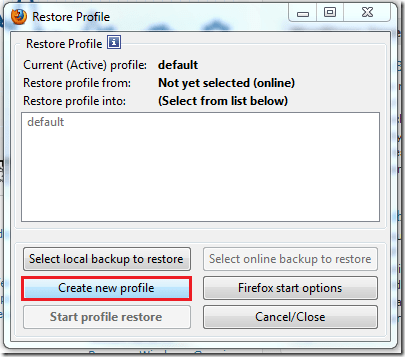
Give it a name.

Now select the profile you just created and click on Start profile restore.
Now restart Firefox and select the profile when you are greeted with profile manager. Select Don’t ask at startup if you don’t want it to ask you every time you run Firefox.
If you run into any issues or need my help, then leave a comment below.
Comments
3 responses to “Backup & Restore your Firefox data using Febe”
[…] some reason the download list of the firefox might get corrupted. Mine happened because I restored my firefox profile backup […]
Please please please!
A simple step-by-step on how to get the backup on USB stick, afterwords?
Just select the backup folder on a USB drive or copy from where you have already backed up.